
www vs non-www and http vs https: duplicate URLs
How the same page ends up on many addresses, which signals tell Google the preferred one, and a quick curl check for your own domain.
By Metryn · Updated 16 October 2026 · 4 min read
Short answer: pick one version of every URL, redirect the others to it with a permanent server-side redirect, and use the same version in your links, canonicals and sitemap. Google can usually guess which one you meant. You'd rather it didn't have to.
Where duplicates come from
Google's own examples are mundane: the same page at www and non-www, and a product page reached with a tracking parameter like ?gclid=. Add http versus https, a trailing slash, upper and lower case, and sort or filter parameters, and one page can answer on a dozen addresses.
What to use, in order
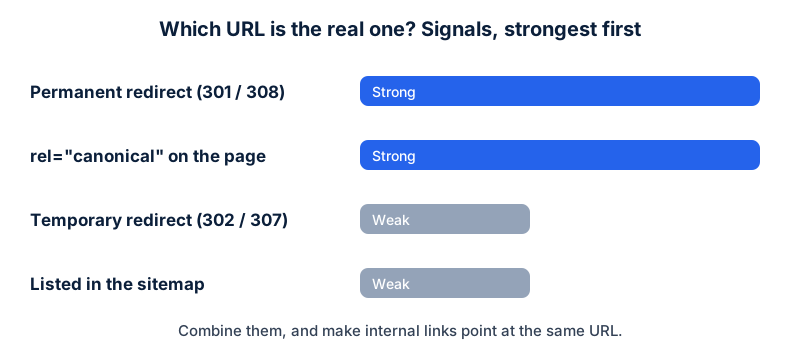
- A permanent redirect (301 or 308), which Google calls a strong signal that the target should be canonical. This is the right tool when you're retiring a duplicate.
rel="canonical", set as a<link>in the head or as an HTTP header (the header also works for PDFs). Also a strong signal. Use absolute URLs, and put a self-referencing canonical on the preferred page.- Sitemap inclusion, which Google calls a weak signal. List only the URLs you consider canonical.
Two details that catch people. Google treats temporary redirects (302, 303, 307) as a weak signal, so using one where you meant a permanent move leaves the old URL in play. And Google says it's fine not to specify a canonical at all, because it will pick the best version, but then the choice is its, not yours.
Stores and parameters
For ecommerce, Google recommends using the same URL form in internal links, sitemaps and canonical tags, giving each page in a paginated series its own URL, and not linking to session IDs, tracking codes or timestamps. Variant pages with their own URLs should point their canonical at the main product URL.
A five-minute check
curl -sI http://yoursite.com/       | grep -i -E 'HTTP|location'
curl -sI https://www.yoursite.com/  | grep -i -E 'HTTP|location'
# one of them should answer 200, the others 301 to it
What a clean setup looks like
A clean setup is boring. Four host and protocol variants exist, and three of them answer with a single permanent redirect to the fourth. The preferred version serves a 200, carries a self-referencing canonical, and is the form used in every internal link and in the sitemap. When you request any variant with curl -I, you see one hop and the same destination.
The mess is almost always one of three things: an old redirect rule that points at a retired host, a CMS setting for the site address that disagrees with the real one, or a CDN that serves both hosts without redirecting. All three are quick to fix once you can see them, and the curl check at the end of this guide shows you which one you have.
Questions people ask
Which version should I choose, www or non-www?
Google doesn't say one is better. The choice isn't what matters. Being consistent is: pick one, redirect the other to it, and use it in links, canonicals and the sitemap.
Do I need a canonical tag if I already redirect?
The redirect is the stronger signal for the duplicates it covers. A self-referencing canonical on the preferred page is still recommended, and it protects you from parameter variants a redirect rule doesn't cover.
Will Google treat my duplicates as a penalty?
The documentation describes canonicalization as helping you control which URL appears, consolidate signals and avoid spending crawl time on duplicates. It doesn't describe duplicates as a penalty, and notes that a site will likely do fine without specifying one. The benefit is control.
What about tracking parameters?
Google's own example is a product page reached with a gclid parameter. Don't link internally to URLs with tracking parameters, and let a canonical on the page point at the clean URL.
What to do this week
- Run the four host variants (http/https, www/non-www) through
curl -Iand confirm three of them redirect permanently to the fourth. - Check your sitemap lists only the preferred form.
- Check the
rel="canonical"on five different page types. - Search your templates for internal links that carry parameters.
Check your own site
Paste your address below. The free scan looks at robots.txt, your sitemap, access for the main AI crawlers and structured data, and shows what it found in seconds. It tells you what a machine can fetch and read. It doesn't predict rankings or citations.
Sources
- Google Search Central: Consolidate duplicate URLs: https://developers.google.com/search/docs/crawling-indexing/consolidate-duplicate-urls
- Google Search Central: Redirects and Google Search: https://developers.google.com/search/docs/crawling-indexing/301-redirects
- Google Search Central: Designing a URL structure for ecommerce sites: https://developers.google.com/search/docs/specialty/ecommerce/designing-a-url-structure-for-ecommerce-sites
- Google Search Central: Sitemaps overview: https://developers.google.com/search/docs/crawling-indexing/sitemaps/overview
Keep reading
Problems and how to fix them
Why isn't my site showing in ChatGPT or AI search?Problems and how to fix them
robots.txt Disallow vs noindex: which to useProblems and how to fix them
"Discovered" vs "Crawled", not indexed: what to do
Want to check one file yourself? Try the free AI crawler robots.txt checker or the llms.txt validator, or read how the score is built.