
robots.txt Disallow vs noindex: which to use
The difference between blocking crawling and blocking indexing, the trap of combining them, and which one to use for each situation.
By Metryn · Updated 16 October 2026 · 4 min read
Short answer: Disallow in robots.txt controls whether a page is crawled. noindex controls whether it appears in results. They aren't interchangeable, and combining them on the same page is the most common way people end up with the opposite of what they wanted.
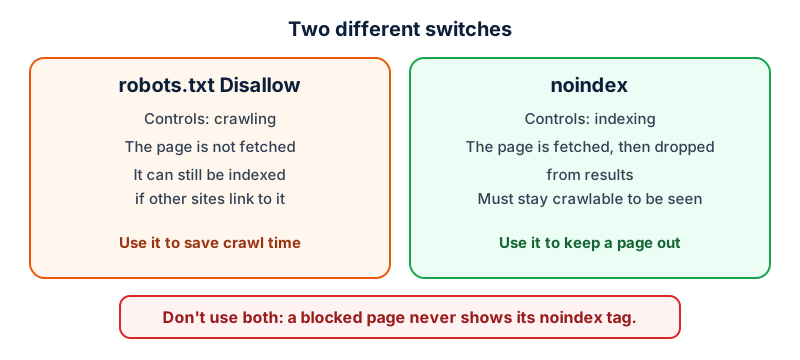
What each one does
Google describes robots.txt as a way to manage crawler traffic, and states plainly that it's not a mechanism for keeping a page out of Google. If other sites link to a disallowed URL, Google may still index it, and the address and anchor text can appear in results, usually without a description.
noindex is the tool for keeping a page out. You add <meta name="robots" content="noindex"> to the page, or send an X-Robots-Tag: noindex header, which also works for PDFs and images. Google then drops the page from results, even if other sites link to it.
The trap
For noindex to work, Google has to be able to fetch the page and read the tag. If robots.txt blocks the page, the crawler never sees the noindex, and the URL can still show up if something links to it. Search Console's own advice for a page you want out is to remove the robots.txt block and use noindex.
Which one do you need?
| You want to | Use | Don't |
|---|---|---|
| Keep a page out of search results | noindex, with the page crawlable | Rely on robots.txt alone |
| Stop crawlers wasting time on filter or internal-search URLs | Disallow in robots.txt | Expect it to remove URLs already known |
| Hide private content | Password protection or removal | Rely on either one |
| Remove a page that's already indexed | noindex, then wait for a recrawl | Block it in robots.txt first |
One practical note: Google says that if a page still appears after you add noindex, it may not have been recrawled yet, which can take months. The URL Inspection tool in Search Console can request a recrawl.
Also worth knowing
Google doesn't support noindex rules written inside robots.txt, so an old Noindex: line in that file does nothing. And robots.txt is a convention defined in RFC 9309. It states your wishes and doesn't enforce them.
Questions people ask
I blocked a page in robots.txt and it still shows up. Why?
Because robots.txt controls crawling and not indexing. Google says that if other sites link to a disallowed URL, it may still index that URL, and the address and anchor text can appear in results, usually without a description.
Can I put noindex inside robots.txt?
Google doesn't support noindex rules in robots.txt, so a Noindex: line there does nothing. Put the directive on the page, as a meta robots tag, or send it as an X-Robots-Tag header.
How long until a noindexed page disappears?
Until Google recrawls it. Google says that can take months, and that the URL Inspection tool lets you request a recrawl. If it's still showing, check first that the page isn't blocked in robots.txt, because then the tag is never seen.
Which is better for duplicate or filter pages?
Google lists robots.txt as the first option for filter parameters you don't want crawled at all, and points to noindex for pages you want out of results. They solve different problems, so choose by the problem.
What to do this week
- List the pages you want kept out of results, and for each one confirm it's crawlable and carries
noindex. - List the URL patterns you want crawlers to skip, and put those in robots.txt.
- Remove any page that appears in both lists from the robots.txt rules.
- Use URL Inspection on one of the pages to see the HTML Google actually received.
Check your own site
Paste your address below. The free scan looks at robots.txt, your sitemap, access for the main AI crawlers and structured data, and shows what it found in seconds. It tells you what a machine can fetch and read. It doesn't predict rankings or citations.
Sources
- Google Search Central: Block Search indexing with noindex: https://developers.google.com/search/docs/crawling-indexing/block-indexing
- Google Search Central: Introduction to robots.txt: https://developers.google.com/search/docs/crawling-indexing/robots/intro
- Search Console Help: Page indexing report: https://support.google.com/webmasters/answer/7440203
- RFC 9309: Robots Exclusion Protocol: https://www.rfc-editor.org/rfc/rfc9309
Keep reading
Problems and how to fix them
Why isn't my site showing in ChatGPT or AI search?Problems and how to fix them
"Discovered" vs "Crawled", not indexed: what to doProblems and how to fix them
Soft 404s and wrong status codes for crawlers
Want to check one file yourself? Try the free AI crawler robots.txt checker or the llms.txt validator, or read how the score is built.