
Why isn't my site showing in ChatGPT or AI search?
The four usual causes (blocked crawler, content missing from the HTML, non-indexable page, or just too soon) and a ten-minute check you can run yourself.
By Metryn · Updated 16 October 2026 · 4 min read
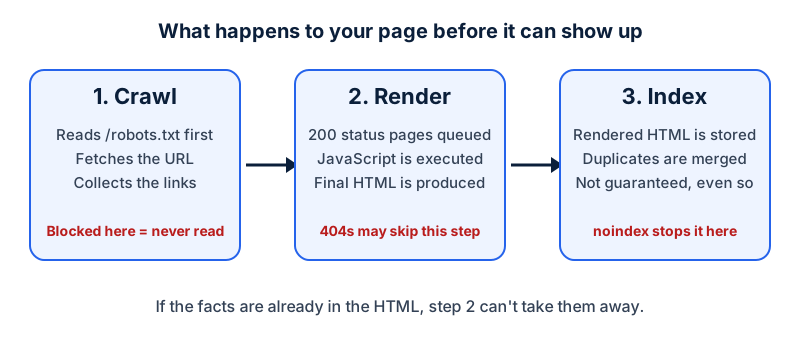
Short answer: almost always it's one of four boring things. A crawler is blocked, the page can't be read without JavaScript, the page isn't indexable, or the site is too new for anything to have happened yet. Nobody can promise you a mention, but you can make sure nothing is in the way.
1. A crawler is blocked
OpenAI says OAI-SearchBot is the crawler used to surface sites in ChatGPT's search features, and that sites that opt out of it won't appear in ChatGPT search answers. Perplexity says PerplexityBot is what surfaces and links sites in its results. If your robots.txt has a blanket Disallow: /, or a rule aimed at one of these names, that's the answer.
A firewall or CDN rule can block them as well, and robots.txt won't show you that. Both OpenAI and Perplexity publish IP ranges for their crawlers, and Perplexity recommends matching the user-agent and those ranges when you set up a WAF.
2. The content isn't in the HTML
Google renders JavaScript but still recommends server-side rendering because, in its words, not all bots can run JavaScript. The OpenAI and Perplexity pages describe what each bot is for and don't say whether they render scripts. If your main text only exists after a bundle loads, you're betting on that.
3. The page isn't indexable
For Google's AI features, the documentation says a page must be indexed and eligible to show a snippet, with no additional technical requirements. A noindex tag, a wrong canonical or a 404 takes you out of that before anything AI-related matters.
4. It's simply early
Both OpenAI and Perplexity say robots.txt changes can take around 24 hours to be picked up. New sites with few links also take time to be discovered at all. Fix what's fixable, then wait before you judge.
A ten-minute check
| Check | How | Looks wrong if |
|---|---|---|
| Crawler rules | Open yoursite.com/robots.txt | A Disallow applies to OAI-SearchBot, PerplexityBot or * |
| Content in HTML | Fetch the page with curl and search the text | Your headline or price isn't in the response |
| Indexable | View source, look for noindex | A robots meta tag or header says noindex |
| Status | Request the URL, read the status code | Anything other than 200 for a real page |
Questions people ask
Do I have to pay or sign up with OpenAI to be included?
Nothing in OpenAI's crawler documentation describes a sign-up. What it describes is a crawler, OAI-SearchBot, that you allow or disallow in robots.txt. Allowing it, and allowing its published IP ranges, is the step the documentation recommends if you want to appear in ChatGPT search.
Is blocking GPTBot the same as blocking ChatGPT search?
No. OpenAI describes the two as independent settings: GPTBot is tied to content that may be used for training, while OAI-SearchBot is the one for search. You can disallow one and allow the other, and OpenAI says that if both are allowed it may use one crawl for both purposes.
I fixed my robots.txt an hour ago and nothing changed. Is it broken?
Probably not. OpenAI says it can take around 24 hours for its systems to adjust after a robots.txt update, and Perplexity gives the same order of magnitude. Wait a day before you conclude anything.
Will fixing all of this make me appear?
It removes obstacles. It doesn't create demand or guarantee a mention. Google's AI features documentation is explicit that being indexed and eligible for a snippet is the requirement, and that appearing isn't guaranteed even then.
What to do this week
- Open
/robots.txton every hostname you serve and read it line by line. - Fetch your three most important pages with
curland confirm the text and price are in the response. - Check each page for a stray
noindexand for a 200 status. - If you run a firewall or CDN with bot rules, check that the crawlers' user-agents and published IP ranges aren't challenged.
- Wait a day, then look at your server logs for the crawler names.
Check your own site
Paste your address below. The free scan looks at robots.txt, your sitemap, access for the main AI crawlers and structured data, and shows what it found in seconds. It tells you what a machine can fetch and read. It doesn't predict rankings or citations.
Sources
- OpenAI: Overview of OpenAI crawlers: https://developers.openai.com/api/docs/bots
- Perplexity: Perplexity crawlers: https://docs.perplexity.ai/guides/bots
- Google Search Central: AI features and your website: https://developers.google.com/search/docs/appearance/ai-features
- Google Search Central: Introduction to robots.txt: https://developers.google.com/search/docs/crawling-indexing/robots/intro
- Google Search Central: JavaScript SEO basics: https://developers.google.com/search/docs/crawling-indexing/javascript/javascript-seo-basics
Keep reading
Problems and how to fix them
robots.txt Disallow vs noindex: which to useProblems and how to fix them
"Discovered" vs "Crawled", not indexed: what to doProblems and how to fix them
Soft 404s and wrong status codes for crawlers
Want to check one file yourself? Try the free AI crawler robots.txt checker or the llms.txt validator, or read how the score is built.