
Soft 404s and wrong status codes for crawlers
What 200, 301, 404 and 5xx mean to a crawler, where soft 404s come from, and how to return the right status for missing and moved pages.
By Metryn · Updated 16 October 2026 · 4 min read
Short answer: a soft 404 is a page that says "not found" to people while telling crawlers everything is fine. The fix is to make the status code tell the truth.
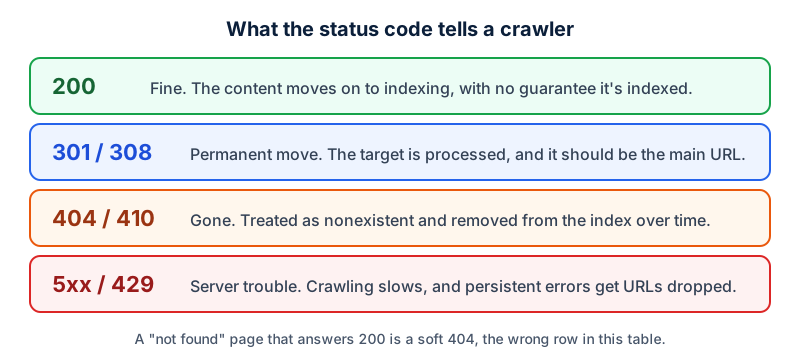
How Google treats each group
- 2xx: the content is passed on to indexing. A 2xx doesn't guarantee indexing, and an empty or error page returning 200 may be reported as a soft 404.
- 3xx: Googlebot generally follows up to 10 hops. 301 and 308 are a strong signal that the target should be processed, and 302, 303 and 307 are a weak one.
- 4xx: apart from 429, they're all handled the same way. The content is treated as nonexistent, indexed URLs are removed over time, and crawl frequency for them gradually falls.
- 429 and 5xx: treated as an overload signal. Crawling slows, indexed URLs are kept at first, and they're eventually dropped if the errors persist.
One warning from the same page: don't use 401 or 403 to limit how fast Google crawls you. That isn't what those codes are for, and they're treated as the content being gone.
Where soft 404s come from
- A template that shows "No results" or "Product unavailable" with a 200 status.
- A single-page app whose router renders a friendly error view for any unknown path.
- A missing page that redirects every time to the homepage.
For single-page apps Google suggests either redirecting with JavaScript to a URL that returns a real 404, or adding a noindex robots meta tag to the error view. Server-side, just return 404 (or 410 if it's gone for good).
When a page really moved
Use a permanent redirect, and make it server-side. Google recommends a permanent server-side redirect whenever possible, and says JavaScript redirects are a last resort because rendering can fail and Google may never see them. Redirect to the closest equivalent page, not the homepage.
Check yours
curl -sI https://yoursite.com/this-page-does-not-exist | head -1
# you want: HTTP/2 404
Questions people ask
Is a 404 bad for my site?
No. Google treats 404 and 410 as content that no longer exists, and removes indexed URLs over time. A true 404 on a page that is gone is the correct answer.
Should I redirect every missing page to the homepage?
That tends to produce the soft 404 pattern. Google's redirect documentation is about pages that have moved or been replaced, and for those you redirect to where the content now lives. For a page that's simply gone, a 404 is the honest answer.
Can I use 403 to slow down a crawler?
Google specifically warns against using 401 or 403 to limit crawl rate, because those codes are treated as the content being unavailable. A 429 or a 5xx is read as an overload signal, which does slow crawling, but is also not a tool to use casually.
What if my server is down for an hour?
Google says that URLs already indexed are kept at first when it sees 5xx or 429 responses, and are eventually dropped if the errors persist. A short outage is not the same as a persistent one.
What to do this week
- Request a made-up URL on each section of your site and read the status code.
- Search your logs for 5xx responses to Googlebot and fix the source.
- Replace homepage redirects for removed pages with a 404, or a redirect to the nearest equivalent.
- If your site is a single-page app, add a
noindexto the error view or return a real 404 from the server.
Check your own site
Paste your address below. The free scan looks at robots.txt, your sitemap, access for the main AI crawlers and structured data, and shows what it found in seconds. It tells you what a machine can fetch and read. It doesn't predict rankings or citations.
Sources
- Google Search Central: HTTP status codes and network errors: https://developers.google.com/search/docs/crawling-indexing/http-network-errors
- Search Console Help: Page indexing report: https://support.google.com/webmasters/answer/7440203
- Google Search Central: JavaScript SEO basics: https://developers.google.com/search/docs/crawling-indexing/javascript/javascript-seo-basics
- Google Search Central: Redirects and Google Search: https://developers.google.com/search/docs/crawling-indexing/301-redirects
Keep reading
Problems and how to fix them
Why isn't my site showing in ChatGPT or AI search?Problems and how to fix them
robots.txt Disallow vs noindex: which to useProblems and how to fix them
"Discovered" vs "Crawled", not indexed: what to do
Want to check one file yourself? Try the free AI crawler robots.txt checker or the llms.txt validator, or read how the score is built.