
Print-on-demand stores: product pages, not copies
Where to edit titles and descriptions for Gelato products on Shopify, why template text is a visibility problem, and what to write instead.
By Metryn · Updated 16 October 2026 · 4 min read
Print-on-demand makes it easy to launch fifty products in an afternoon. It also makes it easy to have fifty pages that look and read like everyone else's. This is about the second part.
The edit that matters, and where to do it
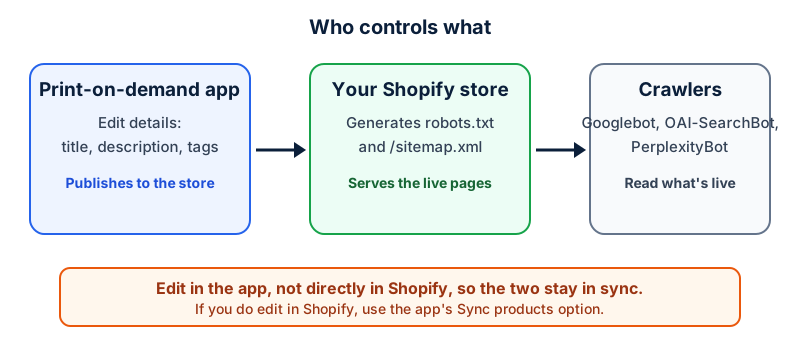
Gelato's help article for products connected to Shopify says that clicking Edit details lets you change the description, title and tags, and that the changes are published to your store immediately. It also says Shopify supports HTML in product descriptions, so you can add structure. It recommends making changes through Gelato rather than directly in Shopify, to keep the two synchronized, and says to use the Sync products option if you edit in Shopify. That article covers Shopify only, so if you sell elsewhere, check that platform's own documentation.
Why the default text is a problem
Google's spam policies don't mention print-on-demand. They do describe thin affiliation as pages where product descriptions are copied directly from the original merchant, and scraping as republishing content without adding value. A template description repeated across every product of the same type isn't a violation by name, but it's the situation those policies describe, and it gives a search system no reason to prefer your page over the next store's.
What to write that a template can't
- Who it's for and what situation it suits. A mug for a runner who gets up at 5am is a different page from a mug.
- The design's story: where the idea came from, what it refers to, who made it.
- Real details: size, material, how it's printed, how long it takes to ship from your actual production location.
- A short care or sizing note, written once per product type and adapted per design.
- Your own photos or mockups with alt text that describes the picture.
Variants and near-duplicates
A design on a T-shirt, a hoodie and a poster is three products, and each deserves its own description. A single design in twelve colours is one product with twelve variants. Google's variant markup is built for the second case, and its canonical guidance says variant pages with their own URLs should point to the main product page. Creating twelve separate products for twelve colours produces the near-duplicate pages Google's doorway abuse policy describes.
Start with the top ten
You don't need to rewrite everything. Pick the ten products that already get visits or that you most want to sell, and make those clearly better than the template. Google's own self-check is a good guide: does the page add something, and would the buyer need to look elsewhere to finish deciding.
Questions people ask
Is selling print-on-demand products against Google's rules?
The policies don't mention it. What they describe is thin affiliation and scraped content: product descriptions copied from the original merchant, and republishing without added value. A store that adds its own description, photos and information is on different ground.
Where do I change a product's title and description?
For Shopify stores connected to Gelato, Gelato's help article says to open the product in the Gelato dashboard and click Edit details, and that the change publishes to your store immediately. It recommends editing through Gelato to keep the two in sync.
Are twelve colour variants twelve products?
Google's variant markup treats them as variants of one product, with distinct URLs per variant and variesBy stating what differs. Separate near-identical products create the duplication problem.
Do I need unique photos?
Not for every product. For the products that matter, your own photos or realistic mockups with descriptive alt text give shoppers more than the provider's default, and they're something no other store has.
What to do this week
- List your ten most important products and write a new description for each.
- Check your variants are variants and not separate listings.
- Add a short sizing or care note per product type.
- Review your shipping times against what your provider actually delivers.
Check your own site
Paste your address below. The free scan looks at robots.txt, your sitemap, access for the main AI crawlers and structured data, and shows what it found in seconds. It tells you what a machine can fetch and read. It doesn't predict rankings or citations.
Sources
- Gelato Help Center: How do I edit my existing Shopify products connected to Gelato?: https://support.gelato.com/en/articles/8996424
- Google Search Central: Spam policies: https://developers.google.com/search/docs/essentials/spam-policies
- Google Search Central: Creating helpful, reliable, people-first content: https://developers.google.com/search/docs/fundamentals/creating-helpful-content
- Google Search Central: Consolidate duplicate URLs: https://developers.google.com/search/docs/crawling-indexing/consolidate-duplicate-urls
- Google Search Central: Product variant structured data: https://developers.google.com/search/docs/appearance/structured-data/product-variants
- Shopify Help Center: Editing robots.txt.liquid: https://help.shopify.com/en/manual/promoting-marketing/seo/editing-robots-txt
Keep reading
Platforms, tools and checklists
Website visibility checklist for non-programmersPlatforms, tools and checklists
Developer checklist: five curl commandsPlatforms, tools and checklists
Shopify stores: visibility fixes without code
Running a store? See Metryn for online stores for what the scan checks and the other guides written for store owners.
Want to check one file yourself? Try the free AI crawler robots.txt checker or the llms.txt validator, or read how the score is built.