
Developer checklist: five curl commands
Raw HTML versus rendered, status codes, host variants, soft 404s and robots.txt, with healthy and unhealthy results, and a note on adding them to CI.
By Metryn · Updated 16 October 2026 · 5 min read
The quickest way to stop guessing is to look at what the server really sends. A browser shows you the finished page. A crawler might see only the first response. These are the checks that tell you which one you have.
Five commands
# 1. Is the content in the first response?
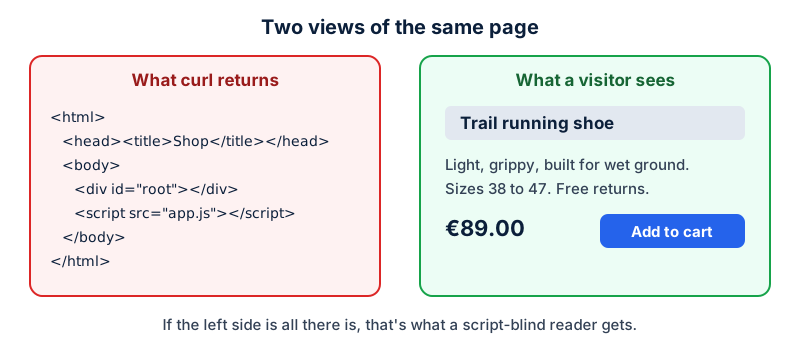
curl -s https://example.com/product/x | grep -i -E 'trail running shoe|89\.00|application/ld\+json'

# 2. Status, redirects and indexing headers
curl -sI https://example.com/product/x | grep -i -E '^HTTP|location|x-robots-tag|link:'

# 3. Host and protocol variants all land in one place
for u in http://example.com/ http://www.example.com/ https://www.example.com/; do
  curl -sI -o /dev/null -w "%{http_code} %{redirect_url}  <- $u\n" "$u"
done

# 4. A missing page really is a 404
curl -s -o /dev/null -w '%{http_code}\n' https://example.com/this-does-not-exist-123

# 5. What robots.txt says to the crawlers you care about
curl -s https://example.com/robots.txt
What each result should tell you
| Command | Healthy | Investigate |
|---|---|---|
| 1. Content in response | Name, price and JSON-LD present | Only a root <div> and a script |
| 2. Headers | 200, and no stray X-Robots-Tag: noindex | A noindex header on a page you want indexed, or 5xx |
| 3. Host variants | One 200, the rest permanent redirects to it | Two hosts both answering 200, or 302s |
| 4. Missing page | 404 | 200 (soft 404) or a redirect to the homepage |
| 5. robots.txt | No rule hiding what you want found | Disallow: / or rules naming OAI-SearchBot/PerplexityBot |
Notes from the documentation
- Google recommends server-side or pre-rendering, partly because not all bots can run JavaScript. It also says 200 pages are queued for rendering and non-200 pages may skip it.
- A 302 is a weak signal that the target should be canonical, and 301 or 308 is a strong one. Use the permanent codes for permanent moves.
- For
noindexto work the page must be crawlable. Don't block it in robots.txt as well. - Links should be
<a href>. Avoid fragments for routing, and use the History API with real paths. - Structured data must represent visible content, and Google says markup that breaks its guidelines can lead to a manual action that removes rich result eligibility. JSON-LD is the recommended format.
- Each OpenAI crawler setting is independent. Allowing
OAI-SearchBotand disallowingGPTBotis a valid combination.
Put it in CI
These checks are cheap and rarely change, which makes them a good fit for a post-deploy smoke test. A broken robots.txt, a stray noindex from a staging config, or a template that stopped emitting a title are exactly the regressions nobody notices for weeks. Fail the deploy if the homepage, one product page and one article each return 200, contain their title, and carry no noindex.
Questions people ask
Should I test with a search-engine user-agent?
Be careful. Requests from your machine with a crawler's user-agent string show how your server responds to that string, but they don't come from the crawler's real IP ranges, so a firewall that checks both can respond differently. Treat it as a first check, and use your logs for the truth.
How do I know whether a bot is the real one?
OpenAI and Perplexity publish IP ranges for their crawlers. Perplexity recommends matching both the user-agent and those ranges and refreshing the lists regularly, and OpenAI publishes one list per crawler.
Is server-side rendering required?
Google doesn't require it. It recommends it, mainly because it's faster for users and crawlers and because not all bots can run JavaScript. If your content is in the HTML for another reason, you're already there.
What about structured data in a client-rendered page?
Google works with it, but its merchant listing documentation recommends placing Product markup in the initial HTML and says JavaScript-generated markup can make shopping crawls less frequent and less reliable.
What to do this week
- Add the five curl checks to your deploy pipeline as a smoke test.
- Alert on a non-200 from your homepage or a
noindexin the response. - Log crawler hits by user-agent so you can see who actually visits.
- Review your robots.txt in the same pull request as any routing change.
Check your own site
Paste your address below. The free scan looks at robots.txt, your sitemap, access for the main AI crawlers and structured data, and shows what it found in seconds. It tells you what a machine can fetch and read. It doesn't predict rankings or citations.
Sources
- Google Search Central: JavaScript SEO basics: https://developers.google.com/search/docs/crawling-indexing/javascript/javascript-seo-basics
- Google Search Central: HTTP status codes and network errors: https://developers.google.com/search/docs/crawling-indexing/http-network-errors
- Google Search Central: Consolidate duplicate URLs: https://developers.google.com/search/docs/crawling-indexing/consolidate-duplicate-urls
- Google Search Central: Block Search indexing with noindex: https://developers.google.com/search/docs/crawling-indexing/block-indexing
- Google Search Central: Link best practices: https://developers.google.com/search/docs/crawling-indexing/links-crawlable
- Google Search Central: General structured data guidelines: https://developers.google.com/search/docs/appearance/structured-data/sd-policies
- OpenAI: Overview of OpenAI crawlers: https://developers.openai.com/api/docs/bots
Keep reading
Platforms, tools and checklists
Website visibility checklist for non-programmersPlatforms, tools and checklists
Shopify stores: visibility fixes without codePlatforms, tools and checklists
Print-on-demand stores: product pages, not copies
Want to check one file yourself? Try the free AI crawler robots.txt checker or the llms.txt validator, or read how the score is built.