
Links and images crawlers can't use
Which kinds of links Google may not follow, what makes link text and image alt text useful, and a simple way to test your own navigation.
By Metryn · Updated 16 October 2026 · 4 min read
Short answer: a crawler follows <a> elements with an href. Buttons with click handlers, javascript: links and routes built on # fragments may never be followed, so whatever sits behind them can stay undiscovered.
Links
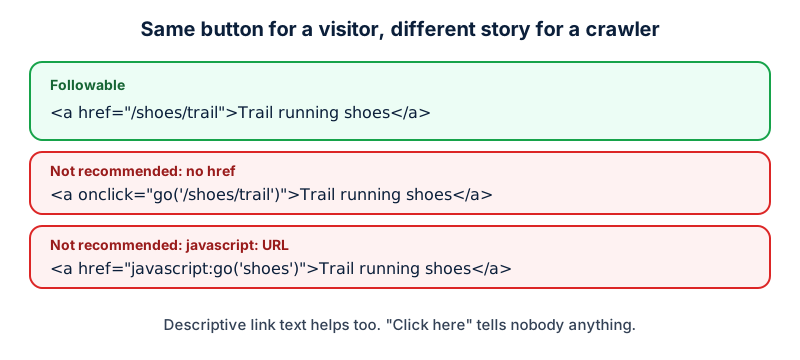
Google says it generally follows only <a> elements with an href, and that links inserted by JavaScript work if they use the same markup. It lists as not recommended an <a> with only an onclick, a <span href> that isn't a real link, javascript: URLs and framework-specific attributes such as routerLink.
Anchor text matters too. Google asks for text that's descriptive, reasonably concise and relevant to both pages, and says to avoid generic phrases like "click here" and "read more". For an image that is a link, the alt text acts as the anchor text.
Every page you care about needs a link to it
Google puts it directly: every page you care about should have a link from at least one other page on your site. Pages reachable only through a search box, a filter you have to submit or a script-driven menu are the usual orphans.
Images
- Use a real
<img>element. Google finds images in thesrcattribute, and doesn't index CSS background images. - Write alt text that's descriptive and relevant to the page. Google warns that stuffing keywords into it hurts users and can be treated as spam.
- Use descriptive filenames:
black-trail-running-shoe.jpgbeatsIMG00023.JPG. - If you use
srcsetor<picture>, keep an<img>with asrcfallback, since some browsers and crawlers don't support those attributes. - Make sure image files aren't blocked by robots.txt or hidden behind a login.
How to check
Turn JavaScript off in your browser and try to get from the homepage to your main pages by clicking. Whatever you can't reach is what a simple crawler can't reach either. Then view the source of a product or article and look for <img with real alt values.
Why this problem hides so well
It's invisible to everyone who uses the site. The button works, the menu opens, the gallery slides. Your analytics show the visits that came through the front door, and not the pages nobody reached. A page that only exists behind a script-driven control doesn't generate an error. It just never appears.
The way to find it is to look from the outside. List the URLs you expect to exist, from your sitemap or your CMS, and compare them to what you can reach by following links from the homepage with scripts disabled. The difference is your orphan list, and it's usually longer than people expect.
Questions people ask
Is a button the same as a link?
To a crawler, no. Google generally follows <a> elements with an href. A button that runs a script to change the page doesn't give it an address to fetch, so whatever that button reveals may not be discovered.
Do I have to avoid JavaScript navigation completely?
No. Google says links inserted by JavaScript work if they use the same <a href> markup. What matters is that the final markup is a real link, not that it's generated on the server.
Does image alt text matter if the image is decorative?
Google's advice is to write alt text that's descriptive and relevant to the page. For decoration, there's nothing useful to describe, so an empty alt is reasonable. The risk Google names is keyword stuffing, not brevity.
Can images be found without an image sitemap?
Google says crawlers find images in the src attribute of <img> elements, and that an image sitemap helps surface images it might otherwise miss, including those on CDNs. It doesn't index CSS background images.
What to do this week
- Turn JavaScript off and click from the homepage to your top pages.
- Replace any click-handler-only navigation with real links.
- Rename your ten most important images and write real alt text.
- Replace 'read more' and 'click here' with the name of the destination.
Check your own site
Paste your address below. The free scan looks at robots.txt, your sitemap, access for the main AI crawlers and structured data, and shows what it found in seconds. It tells you what a machine can fetch and read. It doesn't predict rankings or citations.
Sources
- Google Search Central: Link best practices: https://developers.google.com/search/docs/crawling-indexing/links-crawlable
- Google Search Central: Image SEO best practices: https://developers.google.com/search/docs/appearance/google-images
- Google Search Central: JavaScript SEO basics: https://developers.google.com/search/docs/crawling-indexing/javascript/javascript-seo-basics
Keep reading
Problems and how to fix them
Why isn't my site showing in ChatGPT or AI search?Problems and how to fix them
robots.txt Disallow vs noindex: which to useProblems and how to fix them
"Discovered" vs "Crawled", not indexed: what to do
Want to check one file yourself? Try the free AI crawler robots.txt checker or the llms.txt validator, or read how the score is built.