
Multilingual sites: common hreflang mistakes
Return links, valid language and region codes, x-default and canonicals, with a copy-ready example and the three ways to implement it.
By Metryn · Updated 16 October 2026 · 4 min read
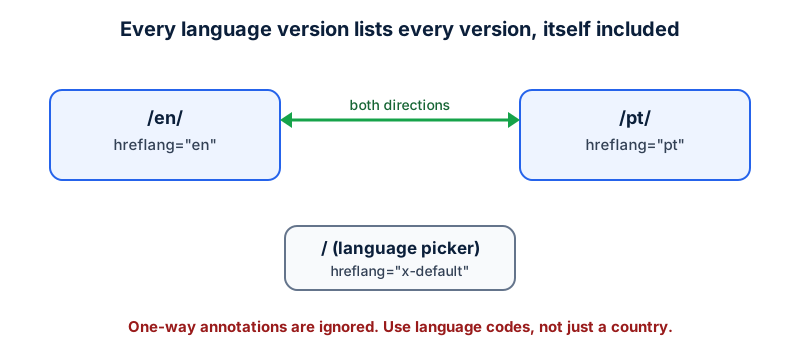
Short answer: each language version has to list itself and every other version, and each of those has to list it back. One-way annotations are ignored. Most hreflang problems are a missing return link or a wrong code.
When you need it
Google says to use hreflang when you have more than one language or regional version of a page: translated templates with the same main content, small regional variations within one language, or fully translated sites. It may find alternates without it, but explicit annotations are usually better.
Three ways, pick one
| Method | Good when |
|---|---|
<link rel="alternate" hreflang> in the head | You control the HTML and have no sitemap setup |
HTTP Link header | Non-HTML files such as PDFs |
xhtml:link entries in the XML sitemap | Large sites where editing every template is hard |
<link rel="alternate" hreflang="en" href="https://example.com/en/" />
<link rel="alternate" hreflang="pt" href="https://example.com/pt/" />
<link rel="alternate" hreflang="x-default" href="https://example.com/" />The mistakes Google calls out
- Missing return links. If page X points to page Y and Y doesn't point back, the annotations are ignored.
- Wrong language codes. Use ISO 639-1 for language and ISO 3166-1 Alpha-2 for region. A country code alone is invalid, since the first code has to be the language.
- Wrong region codes, such as
UK(the valid code isGB) orEU, which Google ignores. - Skipping
x-default. It's the fallback for visitors whose language matches none of your versions, usually a language picker. - Relative URLs. Alternate URLs should be fully qualified.
Keep canonicals consistent with this. A canonical that points every translation at one language tells Google the translations are duplicates of that page, which is the opposite of what hreflang is saying.
A worked example: one page, three versions
Take a shop with an English page at /en/, a Portuguese page at /pt/ and a language picker at the root. Each of the two content pages carries three annotations: one for itself, one for the other language and one x-default pointing at the picker. The picker carries the same three. Nothing is missing, so nothing is ignored.
Now change one thing: you add a Spanish page at /es/ and only list it on the new page itself. The English and Portuguese pages don't mention it. Google says annotations must be reciprocal, so the Spanish page's links are ignored until the other pages list it back. This is the most common way a working setup quietly stops working: one new version is added in one place.
The safest way to avoid it is to generate the annotations from a single list of versions, in a template or in the sitemap, rather than writing them by hand per page. One list means every page always gets the same, complete set.
Questions people ask
Do I need hreflang if my site has two languages?
Google says it may find alternates without it, and that explicit annotations are usually better. If you do have language versions with the same main content, annotate them.
Can I use a country code only, like 'pt'?
pt is a language code (Portuguese) and is valid on its own. What's invalid is a country code in the first position, such as be, which would read as Belarusian. For a specific region add the region after the language, as in pt-PT.
What does x-default do?
It names the fallback page for visitors whose language matches none of your versions, usually a language picker. It doesn't need a language code.
Is auto-translating my pages okay?
Google's spam policies list scaled content abuse, which includes generating many pages with little added value, and translation of scraped content as an example. Machine translation of your own useful content is a different matter, but check each page reads well for a native speaker before you publish it.
What to do this week
- Pick one page and check that every version lists itself and the others.
- Fix any
UK,EUor country-only code. - Add
x-defaultto the page that lets visitors pick a language. - Make sure each version's canonical points at itself.
Check your own site
Paste your address below. The free scan looks at robots.txt, your sitemap, access for the main AI crawlers and structured data, and shows what it found in seconds. It tells you what a machine can fetch and read. It doesn't predict rankings or citations.
Sources
- Google Search Central: Localized versions of your pages: https://developers.google.com/search/docs/specialty/international/localized-versions
- Google Search Central: Consolidate duplicate URLs: https://developers.google.com/search/docs/crawling-indexing/consolidate-duplicate-urls
- Google Search Central: Sitemaps overview: https://developers.google.com/search/docs/crawling-indexing/sitemaps/overview
Keep reading
By type of site
Local business and restaurant website checklistBy type of site
Blog and publisher sites: template fixesBy type of site
Agency and portfolio sites that hide their work
Want to check one file yourself? Try the free AI crawler robots.txt checker or the llms.txt validator, or read how the score is built.